

How to deactivate Facebook in less than two minuites

We have been using Facebook for a decade now, and it’s surely wonderful to stay connected with your friends, family, and run your business. But you might be someone who did not find the platform interesting, or someone who just wants to take a social media break or undergo a Facebook detox. We feel you.

Reports from nrp.org suggest that Facebook has exposed the data of 530 million users, which has made people question Facebook’s privacy policy. Whatever might be your issue. We are here to solve that. So if you are someone browsing the internet on how to deactivate Facebook, these are the following methods that would help you achieve your goal. 

Method 1: How to deactivate Facebook through Android and IOS

Step 1: Open the Facebook app on your Android and iOS device, and then tap on the three-dot menu at the or right. After that, click on settings and privacy, then navigate to settings. Once you click the settings, you will be directed to the accounts center.
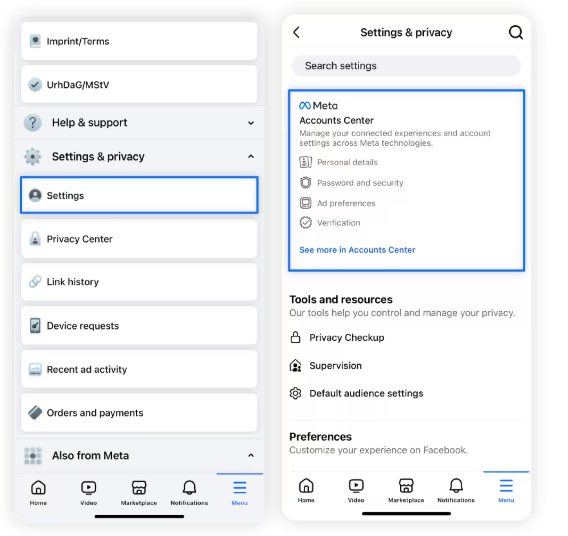
Image courtersy: Norton

Step 2: In the accounts centre, tap on personal details and then navigate to accounts ownership and control.
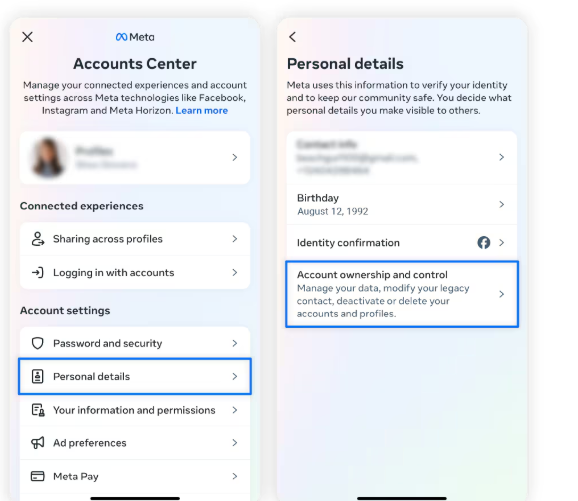
Image courtersy: Norton

Step 3: When you select account ownership and control, you will be directed to an option known as deactivation or deletion, and then select Deactivate Your Account.
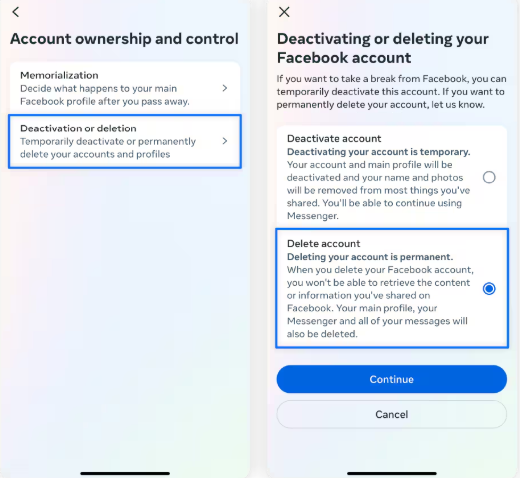
Image courtesy: Norton

Step 4: Now, all you have to do is enter your Facebook credentials, and deactivation will take place.

Method 2 : How to deactivate Facebook through Pc and Mac

  • In your browser, go to Facebook.com and then tap on the profile picture in the upper right corner. 
  • Then navigate to settings and privacy, and then click on settings. 
  • Once the settings are selected, you navigate to the Meta Accounts Center
  • Tap on personal details and then on account ownership and control
  • Now, click on deactivate account and add your Facebook credentials for deactivation. 
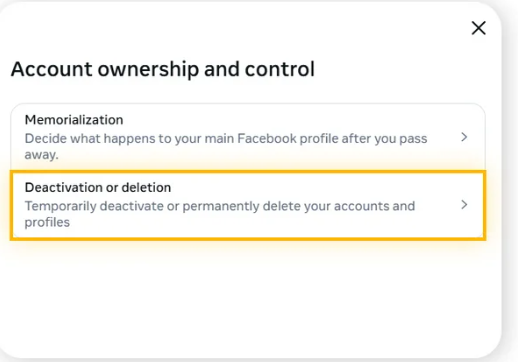
Image courtesy: Be connected

What’s the difference between deactivating Facebook and deleting Facebook

Be connected explains the difference beautifully. They say people often confuse the two, but they are different. When you delete your Facebook account, your profile will be hidden from the public. People can no longer view your status update, timeline, and profile picture. Your friend list is the only section that can view your profile and friend list. 

Note: Deactivation is a temporary account suspension, which means all your Facebook content will be stored and can be retrieved when you come back again. Your messenger will be available even after deactivation. Your friends can still message you.

Deletion would mean that you are permanently killing your Facebook account. All your account data will be wiped out, and you can no longer retrieve it. Your messages get deleted, too. Now, if you decide to come to Facebook, you need to open a new account.

Benefits of deactivating a Facebook account

  • You can retrieve your account if you change your mind. 
  • Your videos, photos, and posts won’t be wiped out of the internet. 
  • Your messenger would still be active. 
  • If you use your Facebook login for other mediums, it would still function. 

Cons of deactivating a Facebook account

  • Since your data is not wiped out, you will be at risk of a Facebook data breach. 
  • Facebook will have the authority to track your data.
  • Facebook Marketplace won’t be accessible to you. 

Parting tips

We have explained quick and easy ways on how to deactivate Facebook in two simple methods. If you see that we have missed any point regarding the deactivation issue, make sure to pin those down in the comments, and we would be happy to incorporate them.


Similar Posts

  • /

    Know how Access control systems save multi billion-dollar companies?

    Originally published on Medium on Jun 9, 2020 , this article explores how access control systems help protect multi-billion-dollar organizations by securing physical and digital assets. It explains the importance of authentication, authorization, biometric security, role-based access control (RBAC), and modern access management solutions in preventing unauthorized access and strengthening organizational security. This page contains a brief preview of the original article. To read the complete guide with detailed insights and real-world examples, continue reading on Medium using the button below.

  • /

    Enterprise Risk management — what is it and why you need it?

    Originally published on Medium on Jun 6, 2020, this article explores the fundamentals of Enterprise Risk Management (ERM) and why it is essential for organizations of all sizes. It explains how businesses identify, assess, monitor, and mitigate strategic, financial, operational, and cybersecurity risks to protect their assets, ensure business continuity, and support long-term growth. This page contains a brief preview of the original article. To read the complete guide with detailed insights and practical examples, continue reading on Medium using the button below.

  • /

    How to learn salesforce lightning

    Originally published on Medium on Apr 5, 2020, this article provides a beginner-friendly guide to learning Salesforce Lightning. It explores the core concepts of the Lightning Platform, Lightning Experience, Lightning Components, and practical learning resources that can help aspiring Salesforce professionals build in-demand CRM skills. This page contains a brief preview of the original article. To read the complete guide with step-by-step insights and recommendations, continue reading on Medium using the button below.

  • /

    ZERO DAY ATTACK — An Attack That Is Lighting Fast

    Originally published on Medium on Jun 8, 2020, this article explores what zero-day attacks are, why they pose one of the most serious cybersecurity threats, and how they exploit previously unknown software vulnerabilities before developers can release a fix. It explains the risks associated with zero-day exploits, their impact on individuals and organizations, and the importance of proactive security measures to minimize potential damage. This page contains a brief preview of the original article. To read the complete guide with detailed explanations and examples, continue reading on Medium using the button below.

  • /

    Is application hardening really needed in 2020? If so, why?

    Originally published on Medium on Jun 9, 2020, this article explores why application hardening became increasingly important in 2020 as cyber threats continued to evolve. It discusses how application hardening reduces security vulnerabilities, protects sensitive data, strengthens software against attacks, and helps organizations defend against malware, exploits, and unauthorized access. This page contains a brief preview of the original article. To read the complete guide with detailed explanations and best practices, continue reading on Medium using the button below.

  • /

    Fraud Detection Analysis In Data Science

    Originally published on Medium on Jul 22, 2020, this article explores how data science techniques are used to detect and prevent fraudulent activities across industries such as banking, e-commerce, and finance. It covers the role of machine learning, predictive analytics, anomaly detection, and data-driven models in identifying suspicious transactions and reducing financial risk. This page contains a brief preview of the original article. To read the complete guide with detailed explanations and real-world examples, continue reading on Medium using the button below.

Leave a Reply

Your email address will not be published. Required fields are marked *